
What This Issue Means
Outlook works by connecting to your email provider’s servers (such as Microsoft, Gmail, or your company’s email system).
If that connection fails, Outlook cannot sync your inbox, send emails, or update your folders.
This usually happens due to:
- Internet connection problems
- Incorrect account settings
- Security restrictions
- Temporary server issues
Common Symptoms
You may notice one or more of the following:
- Emails not sending or receiving
- Outlook showing “Disconnected” or “Trying to connect”
- Slow or frozen inbox
- Repeated password prompts
- Error messages when opening Outlook
Why Outlook Cannot Connect to Server
- No internet or unstable connection
- Incorrect email server settings
- Changed or expired password
- Firewall or antivirus blocking Outlook
- Email server downtime
- Corrupted Outlook profile
Quick Fix Summary
If you're in a hurry, try these first:
- Check your internet connection
- Restart Outlook
- Restart your computer
- Re-enter your email password
How to Fix Outlook Cannot Connect to Server (Step-by-Step)
Follow these steps in order. Most users fix the issue within the first few steps.
Check Your Internet Connection
Outlook cannot connect without a stable internet connection.
- Open a website in your browser
- If it doesn’t load, restart your router
- Try switching networks (Wi-Fi or hotspot)
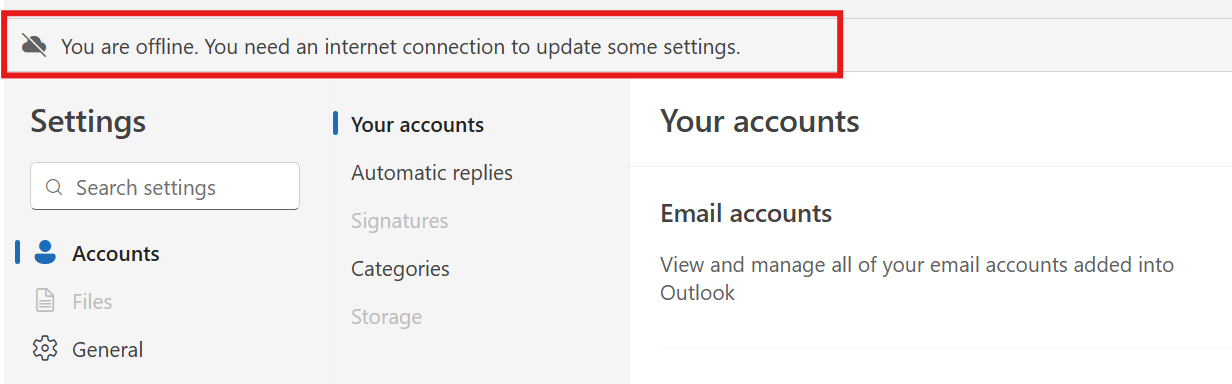
In the new Outlook, you may not see a traditional “cannot connect to server” (usually at the bottom right hand side) error. Instead, Outlook may show messages like “You are offline” or simply stop syncing emails. This still indicates a connection issue between Outlook and the email server.
Restart Outlook
Temporary glitches can prevent Outlook from connecting.
- Close Outlook completely
- Wait 10–15 seconds
- Reopen and try again
Restart Your Computer
Restarting your system can fix hidden network or background issues.
Check Account Settings
Incorrect server settings are a common cause.
- Go to File → Account Settings
- Select your email account
- Verify IMAP/SMTP settings
Re-enter Your Password
If your password has changed, Outlook may fail to connect.
- Remove and re-add your account
- Enter the correct password
Disable Antivirus or Firewall (Temporarily)
Security software may block Outlook connections.
Note: Only do this if you trust your system.
Update Outlook
Keeping Outlook updated ensures compatibility with servers.
Advanced Fixes (If Issue Still Not Resolved)
Check Server Status
Sometimes the issue is on your email provider’s side. Check their service status page.
Create a New Outlook Profile
- Open Control Panel → Mail
- Click “Show Profiles”
- Create a new profile
- Add your account again
Turn Off Offline Mode
- Go to Send/Receive tab
- Make sure “Work Offline” is disabled
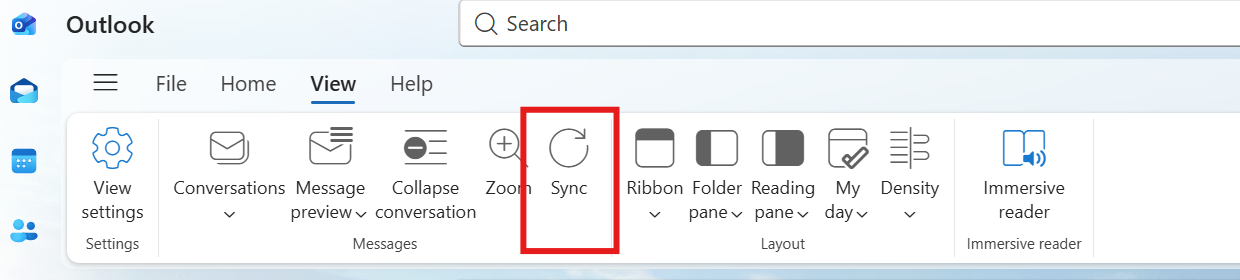
In the new version of Outlook, there is no “Send/Receive” button like in older versions. Emails are synced automatically, but you can click the Sync button shown below to manually check for new messages or refresh your inbox.
Real Life Example
A common situation is when someone changes their email password but forgets to update it in Outlook.
Outlook keeps trying to connect using the old password, which results in a connection error.
Once the correct password is entered, Outlook reconnects instantly and everything works again.
This is why simple fixes often solve what looks like a serious issue.
Frequently Asked Questions
Why is Outlook not connecting to server?
Can restarting fix this?
Do I need to change settings?
What if nothing works?
Final Thoughts
The "Outlook cannot connect to server" error is common and usually easy to fix.
Start with simple steps like checking your internet and restarting Outlook before moving to advanced fixes.
In most cases, the issue is temporary and can be resolved within minutes.