
The good news is that this is a common issue and is usually caused by connection problems or incorrect settings.
Below, we’ll walk through what this error means and how to fix it step by step.
What This Issue Means
Error 0x80042108 occurs when Outlook fails to establish a connection with your incoming or outgoing mail server.
Outlook relies on protocols like IMAP, POP, and SMTP to communicate with your email provider. If this connection fails, Outlook cannot sync your emails.
You may notice:
- Emails not sending or receiving
- Send/Receive errors appearing
- Outlook showing “Disconnected”
- Repeated connection attempts failing
Common Symptoms
- Outlook cannot connect to server
- Emails stuck in outbox
- Inbox not updating
- Repeated password prompts
- Connection timeout errors
Why Outlook Error 0x80042108 Happens
- Incorrect email account settings
- Firewall or antivirus blocking Outlook
- Unstable or slow internet connection
- Corrupted Outlook profile
- Email server downtime
- Incorrect port or encryption settings
Quick Fix Summary
If you're in a hurry, try these first:
- Check your internet connection
- Verify account settings
- Restart Outlook
- Disable antivirus temporarily
These steps fix the issue for most users.
How to Fix Outlook Error 0x80042108 (Step-by-Step)
Follow these steps in order. After each step, check if Outlook connects successfully.
Check Your Internet Connection
Outlook needs a stable connection to communicate with your mail server.
- Open a website to confirm connectivity
- Restart your router or Wi-Fi
- Switch to another network if needed
Verify Email Account Settings
Incorrect server settings are the most common cause.
- Go to File → Account Settings
- Select your account
- Check IMAP/POP and SMTP server details
- Ensure ports and encryption settings are correct
Restart Outlook
Temporary issues can interrupt server communication.
Disable Antivirus or Firewall Temporarily
Security software may block Outlook from connecting.
Only do this on trusted networks.
Run Outlook in Safe Mode
Add-ins can interfere with Outlook connections.
- Hold Ctrl while opening Outlook
- Click “Yes” when prompted
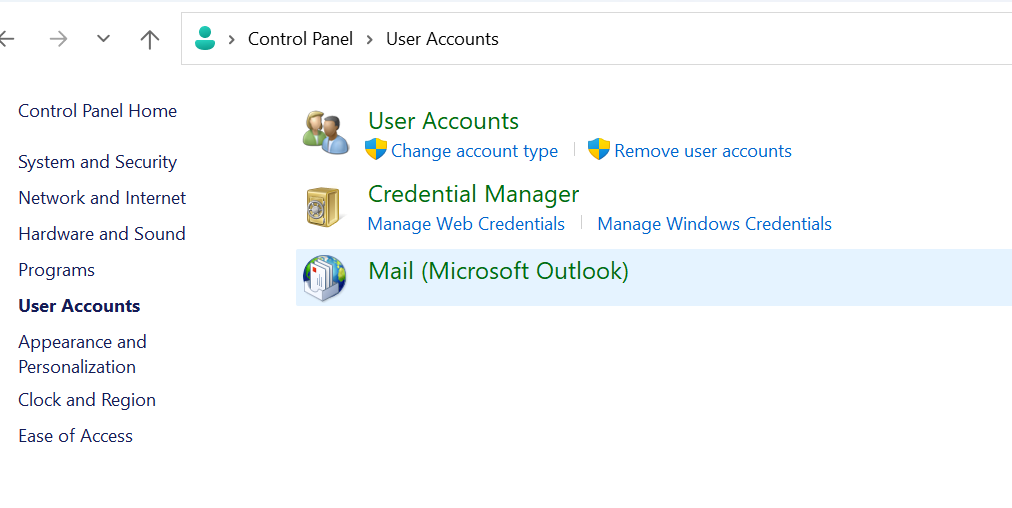
Create a New Outlook Profile
A corrupted profile can prevent Outlook from connecting properly.
- Go to Control Panel → Mail
- Create a new profile
- Set it as default
Check Ports and Encryption Settings
Incorrect settings can block connections.
- Verify SMTP port (587 or 465)
- Check IMAP/POP ports
- Ensure SSL/TLS is enabled
Advanced Fixes (If Error Still Appears)
Repair Outlook Installation
Corrupted Outlook files can prevent server communication.
Re-enter Account Credentials
Incorrect or expired passwords can block access.
Recreate Email Account
Removing and re-adding your account can resolve persistent issues.
Real Life Example
A common situation is when a user switches networks or updates their email password.
Outlook may continue using old settings, resulting in connection failure and error 0x80042108.
Updating account settings or restarting Outlook usually resolves the issue quickly.
Frequently Asked Questions
What does error 0x80042108 mean?
Is this caused by my internet?
Can antivirus block Outlook?
What is the fastest fix?
Final Thoughts
The Outlook error 0x80042108 is a common connection issue and usually easy to fix.
Start with simple checks before moving to advanced troubleshooting.
In most cases, Outlook will reconnect within minutes.